
Sumsub AML screening
AML screening from Sumsub: sanctions, PEP, adverse media, and watchlist checks, with every possible match landing on the customer's case in Zenoo for a person to review.
At a glance
Overview
Sumsub AML screening overview
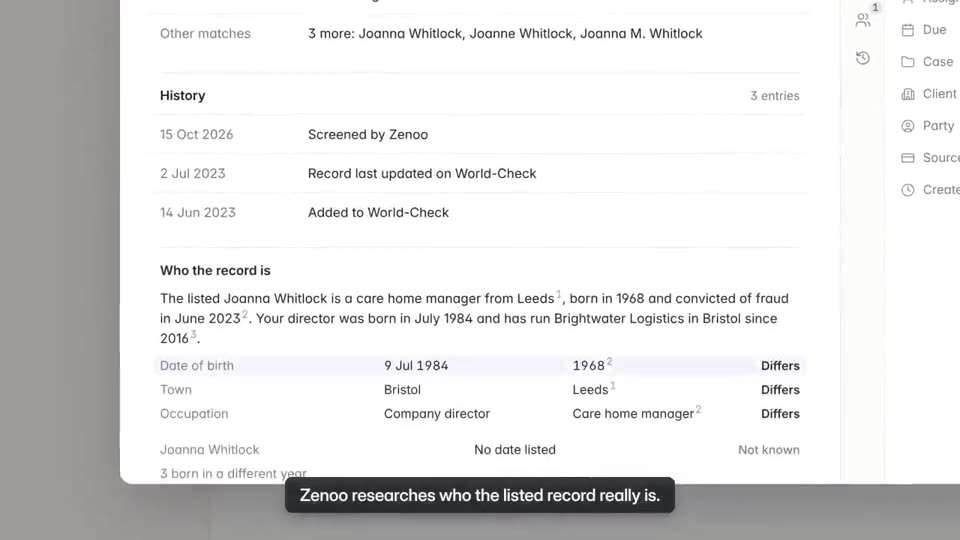
Zenoo uses Sumsub for AML screening. Each customer is checked against sanctions lists, politically exposed persons (PEPs) and their relatives and close associates, adverse media, and wider watchlists. Sumsub's results come back to Zenoo, and every possible match lands on the customer's case for a person to review.
Sumsub says it screens more than 50,000 global and local data sources across 240+ countries and territories, including the OFAC, UN, HMT, EU, and DFAT sanctions lists. By default its screening runs on ComplyAdvantage data, and you can bring your own ComplyAdvantage, World-Check One, or Quantifind keys instead.
Sumsub also sells document and identity verification, KYB, and transaction monitoring. Zenoo's Sumsub connector does not run those: it is for screening. Pair a document verification provider in the same flow if you need one.
- Company
- Sumsub
- Category
- AML screening
- Strongest in
- Sanctions, PEP, and adverse media screening across 50,000+ sources
- Best fit
- Teams that want Sumsub's screening on the same case as their other providers
Where it is strongest
Key strengths
What Sumsub AML screening does well.
Wide source coverage
Sumsub says it screens more than 50,000 global and local data sources across 240+ countries and territories.
Sanctions, PEPs, and adverse media together
Global and national sanctions lists including OFAC, UN, HMT, EU, and DFAT, PEPs with their relatives and close associates, and adverse media tagged by category.
Choice of screening data
Sumsub's documentation describes bring-your-own-key options for ComplyAdvantage, World-Check One, and Quantifind, so you can keep a data contract you already hold.
Published pricing
AML screening is listed on Sumsub's published Compliance plan, which is more transparent than most screening providers.
Who it suits
Best for
Where Sumsub AML screening fits, and what to plan for.
Honest notes on the trade-offs, each with a way to cover the gap inside a Zenoo flow.
- Teams already contracted with Sumsub who want its screening results on one case beside their other providers
- Programmes that want sanctions, PEP, and adverse media screening from one provider
- Teams that want published pricing for screening
- Screening only through Zenoo. Zenoo's Sumsub connector runs AML screening, not Sumsub's document or identity checks. Add a document verification provider from the Marketplace for that step.
- Default data is ComplyAdvantage. Sumsub's documentation says its screening uses ComplyAdvantage data by default. If you already contract ComplyAdvantage directly, check you are not paying twice for the same lists.
- Ongoing monitoring costs extra. Sumsub's documentation lists ongoing AML monitoring as an add-on with an additional cost. Confirm what your agreement covers before relying on it.
- Possible matches still need review. Name screening returns possible matches, and some will be false positives. In Zenoo each hit goes to the Inbox, and a person clears it with the reason kept on the record.
- Monthly minimums. AML screening sits on Sumsub's Compliance plan, which carries a $299 monthly minimum. Early-stage teams should factor that into cash flow.
Open the customer's case
What your team sees
The Sumsub AML screening result, beside everything else.
The result sits with screening and review on one case, so nobody checks a second tool to see the whole customer.
What you can build
- Sanctions, PEP, and adverse media screening at onboarding, with every hit on the customer's case
- Screening the directors and owners found during company onboarding
- Risk-based flows that send higher-risk customers to a second screening provider
About Sumsub AML screening
FAQs
Sumsub AML screening questions.
What does Zenoo use Sumsub for?
AML screening. Zenoo sends the customer to Sumsub for sanctions, PEP, adverse media, and watchlist screening, and Sumsub's results come back to the customer's case. A person reviews and clears every hit.
Does Zenoo run Sumsub's document or ID checks?
No. Zenoo's Sumsub connector runs AML screening only. For document and identity verification, add another provider from the Marketplace to the same flow.
Can we use our own screening data with Sumsub?
Sumsub's documentation describes bring-your-own-key options for ComplyAdvantage, World-Check One, and Quantifind. It notes this may carry integration costs, so check your agreement with Sumsub.
Does Zenoo clear hits automatically?
No. Each possible match goes to the Inbox, and a person clears it. The decision and its reason are kept on the record.
Hands it to your team
Verification is the first step. Compliance Hub handles the rest.
Once a customer is verified, screening and review happen in Compliance Hub. A possible PEP match lands in your team inbox with the evidence and the full history beside it. Zenoo suggests, your team decides.
Pairs well with
 VeriffVerify the person's identity document before screening them.MI
 MiddeskVerify a US business, then screen its directors and owners.LW
 LSEG World-CheckAdd a second watchlist source for higher-risk customers.
Alternatives
 ComplyAdvantageAML screeningLWLSEG World-CheckAML screening · LSEGDJ
 Dow Jones Risk & ComplianceAML screening · Dow Jones & Company, Inc.MK
 Moody's KYCAML screening · Moody's AnalyticsSS
 Sanction ScannerAML screening
More in AML screening


Tomorrow, your case
Bring us a case that went wrong.
We will run it through Zenoo while you watch: the evidence, the decision, and the record your MLRO would want to defend.
30 minutes. Your data. No slides.