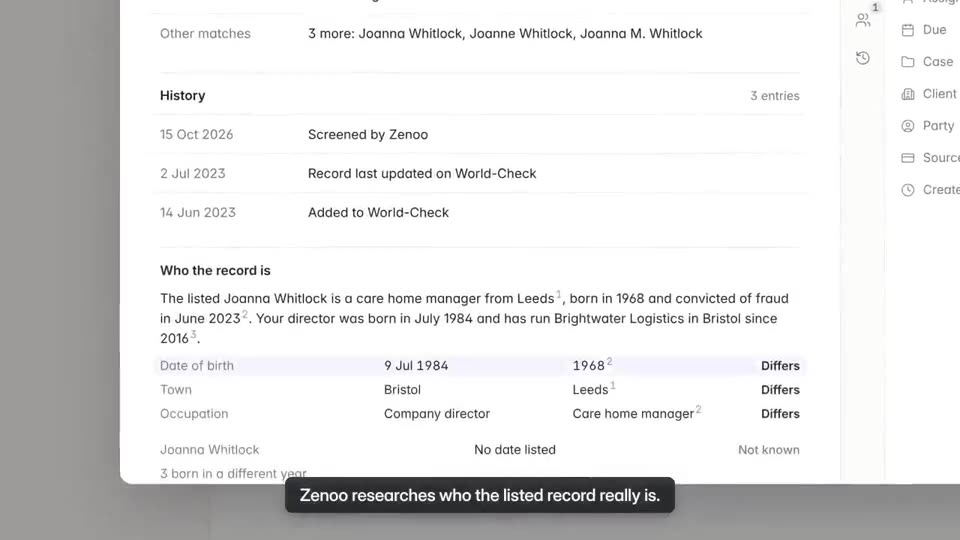


Researched
Every item opens with the research done.
Company record, ownership, screening hits, and documents, gathered in one place before you start. Add your own files beside them.
Compliance Hub inbox
Every hit, request, and approval in one inbox, most important first. Each item arrives with its evidence gathered, a suggested next step, and a record of who decided.
Screening 3
Onboarding 1
Watch it work · 0:52
Where this fits
Your providers send their results in. Zenoo organises them and puts what needs you in the Inbox. You deal with it, tick it off, and the next one comes in. Pick providers from the Marketplace, or bring your own.
Your checksFrom the Marketplace
My inbox0 done
Zenoo suggests. You decide.
The Zenoo way
Why the inbox
Researched
Company record, ownership, screening hits, and documents, gathered in one place before you start. Add your own files beside them.
Suggested
Each hit carries a plain summary and a suggested next step, with its sources. Nothing is cleared until a person clears it.
Recorded
Every override needs a reason, and every approval is timestamped on the case. What Zenoo suggested sits beside what your team decided.
Zenoo AI
On every item, Zenoo reads the evidence and suggests the next step in one plain line, with its sources. A person makes every call, and both go on the record.
All the things
Questions
No. Zenoo suggests the next step and shows its sources. An analyst decides, and nothing is cleared until a person clears it.
Yes. Upload them on the item, beside the records Zenoo gathered, so the whole file is in one place.
Every decision, with who made it, when, and why. Overrides need a reason, and approvals are timestamped on the case.
Yes. Each suggestion is kept beside the decision your team made, with the sources it used.
Deadline and risk. Items close to their deadline, or already over it, rise to the top.
Yes. Onboarding, screening, and investigations can each have a queue with its own deadlines, and items move between them with their history.
Tomorrow, your case
We will run it through Zenoo while you watch: the evidence, the decision, and the record your MLRO would want to defend.
30 minutes. Your data. No slides.