Swedish Bank ID
Efficiently verify Swedish users through Bank ID integration with Zenoo for enhanced security.
Checking your own ID? Zenoo is a service for businesses and cannot check a personal ID. The authority that issued it can help.
The scheme at a glance
Overview
What is Swedish Bank ID?
BankID is Sweden's leading electronic identity solution, operated by Finansiell ID-Teknik BID AB, a company owned by several of the country's banks. It is issued to people through their bank once they hold a Swedish personal identity number (personnummer), and it is used by millions of residents to log in to banks, government services, healthcare, and private-sector services, and to sign documents electronically.
Verification works through the BankID app on the person's phone or computer. The customer opens BankID and approves the request with their security code or device biometrics such as Face ID or fingerprint. There is no document upload or manual form to complete, so most people finish in well under a minute.
On a completed check, BankID confirms control of the credential and returns the person's verified name and Swedish personal identity number, which itself encodes their date of birth. That result, together with a full audit record, flows back into your Zenoo case.
- Issuing authority
- Finansiell ID-Teknik BID AB, owned by Swedish banks
- Country
- Sweden
- Identifier
- Swedish personal identity number (personnummer), 12 digits with the date of birth encoded in the first digits
- Data returned
- Verified given name, surname, and personal identity number
- Coverage
- Widely used by the adult population across banking, government, and private services
- Official status
- Sweden's leading electronic ID, not compulsory
Three steps
How it works
How verification works
The check runs in your flow. The result arrives where your team works.
Person opens BankID
The customer starts the BankID app on their phone or computer to approve the identity request.
Approve with code or biometrics
They confirm with their BankID security code or device biometrics such as Face ID or fingerprint. No document upload or form is needed.
Signals returned to your flow
A verified result with the person's name and personal identity number, plus a full audit record, flows straight into your Zenoo case.
Open the customer's case
What your team sees
The Swedish Bank ID result, beside everything else.
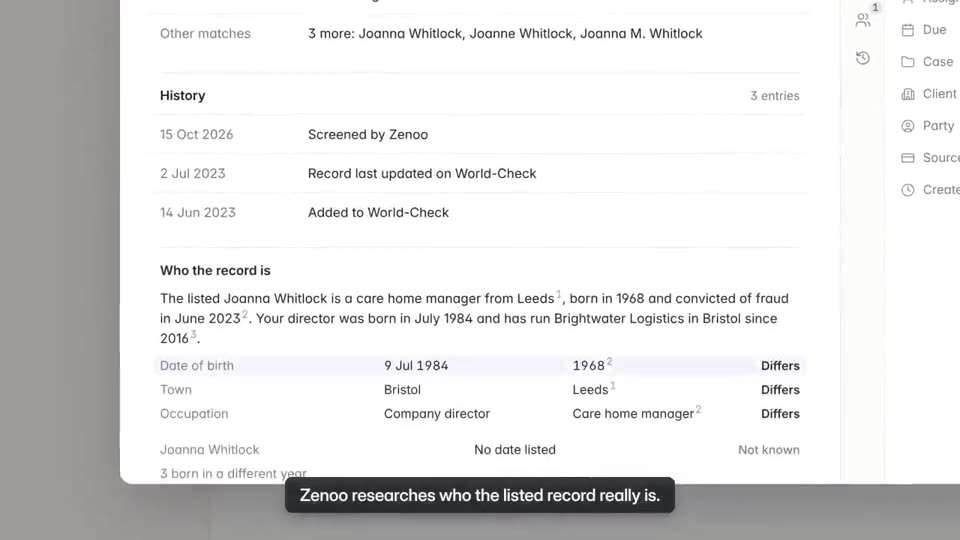
Verification sits with screening and review on one case, so nobody checks a second tool to see the whole customer.
What you can build
- Open a bank account with a login the customer already trusts.
- Onboard new customers for digital services with e-KYC.
- Confirm a lending applicant's identity before you extend credit.
- Give access to government and healthcare services online.
- Capture a legally recognised electronic signature on documents.
About Swedish Bank ID
FAQs
Swedish Bank ID questions.
How do I verify a Swedish BankID identity?
The person opens the BankID app on their phone or computer and approves the request with their security code or device biometrics. BankID then returns their verified name and personal identity number to your service, and Zenoo records the result with a full audit trail.
What data does Swedish BankID return?
A completed check confirms control of the BankID credential and returns the person's verified given name, surname, and Swedish personal identity number (personnummer). The personal identity number encodes the person's date of birth in its opening digits.
Is Swedish BankID mandatory?
No. BankID is Sweden's leading electronic identity and is used across banking, government, and private services, but it is not a compulsory scheme. People obtain it through their bank once they hold a Swedish personal identity number.
Hands it to your team
Verification is the first step. Compliance Hub handles the rest.
Once a customer is verified, screening and review happen in Compliance Hub. A possible PEP match lands in your team inbox with the evidence and the full history beside it. Zenoo suggests, your team decides.
Pairs well with

Related schemes
Tomorrow, your case
Bring us a case that went wrong.
We will run it through Zenoo while you watch: the evidence, the decision, and the record your MLRO would want to defend.
30 minutes. Your data. No slides.