We find expired checks during the audit, not before it.
With ZenooEvery night, parties whose checks have run out are re-screened against the sanctions and PEP lists, and a new match becomes an item for a person.
Ongoing monitoring · After onboarding
Customers re-screened when their checks run out, register changes and new hits brought to a person, and the last decision beside every new item. Zenoo prepares the morning and suggests where to start. Your team makes every call.
30 minutes. Your data. No slides.
Sound familiar?
We find expired checks during the audit, not before it.
Each review starts from scratch, as if we had never met the customer.
A director changes and we hear about it months later.
Failed provider calls pass quietly and nobody notices.
One case, start to finish
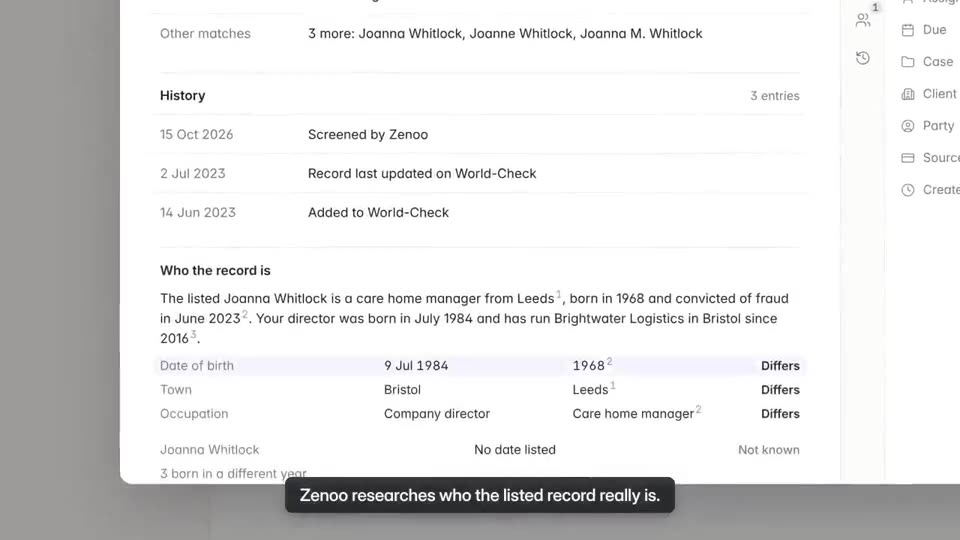
Follow one existing customer through Zenoo, from an overnight re-screen to the decision your analyst records in the morning.
Nothing is cleared or added on its own.
Product screens show fictional data.
Watch it work · 0:50
Where this fits
Your providers send their results in. Zenoo organises them and puts what needs you in the Inbox. You deal with it, tick it off, and the next one comes in. Pick providers from the Marketplace, or bring your own.
Your checksFrom the Marketplace
My inbox0 done
Zenoo suggests. You decide.
What the rules ask
| What the rules ask | Where it lives in Zenoo |
|---|---|
| UK MLR 2017, regulation 28(11)Monitor the business relationship on an ongoing basis and keep due diligence up to date. | Parties are re-screened when their checks run out, and changes and new hits land in the right queue. |
| UK MLR 2017, regulation 27(8)Apply due diligence again when a customer's circumstances change. | A change on the register or a new hit opens an item on the customer, with the last decision beside it. |
| UK sanctionsAct on a true match without delay when a customer is added to a sanctions list. | A new match becomes an item for a person, and a hard-stop watchlist entry blocks approval until a second Financial Crime user agrees. |
| UK MLR 2017, regulation 19Have controls that are applied consistently and can be shown to work. | Every new item has an owner and a due time, and Insights (in pilot) show backlog, ageing and time to decision. |
| UK MLR 2017, regulation 40Keep records of the checks and the reasons for each decision. | Every decision, reason and change is kept in the case history with who made it and when, and nothing can be edited or removed. |
Last reviewed 21 October 2026. Each source links to the official text. A summary to help you compare, not legal advice. Your MLRO sets the policy. Zenoo runs it and keeps the record.
Zenoo AI
When your team logs in, the night's work is in the inbox with a suggestion on each item. Zenoo prepares the morning. It never clears, approves or passes a check.
Getting live
Send applications in through the API, or onboard clients through Zenoo's own journeys. Keep the data vendors you have, under your contracts, and add others from the Marketplace.
Browse the MarketplaceFour to six weeks to production is typical, depending on your providers and systems. It starts with a demo on a case you bring, then a pilot on real cases.
How buying worksIn the EU or US region, or on a dedicated UK tenant. Encrypted with AES-256 at rest and TLS 1.3 in transit. ISO 27001 certification in progress.
Trust and securityQuestions
Keeping what you know about a customer up to date after onboarding: screening them again as lists change, noticing when their details change, and reviewing them in line with their risk.
Checks have an expiry you set. When a party's check runs out, it is re-screened overnight against the sanctions and PEP lists, and a new match becomes an item for a person.
It is retried. If it still fails, the check does not pass. It goes to a person with the reason.
No. Zenoo suggests the next step with its sources. A person clears every hit, and both the suggestion and the decision are on the record.
Yes. Add a person or company to a watchlist with a reason. When they appear again, on any case, the item says so. See watchlists.
No. Zenoo monitors the customer: who they are, who is behind them and whether they appear on lists. Transaction monitoring stays with your existing system.
Tomorrow, your case
We will run it through Zenoo while you watch: the evidence, the decision, and the record your MLRO would want to defend.
30 minutes. Your data. No slides.


