Norwegian Bank ID Login
Effortlessly authenticate Norwegian users securely with Bank ID via Zenoo.
Checking your own ID? Zenoo is a service for businesses and cannot check a personal ID. The authority that issued it can help.
The scheme at a glance
Overview
What is Norwegian Bank ID Login?
Norwegian BankID is a bank-issued electronic identity used across Norway for online banking, public services, and commercial logins. It is issued by Norwegian banks to their customers and supported sector-wide, so a person can use the same credential across different institutions. The scheme is operated by BankID BankAxept AS, which is being renamed Stø and is expected to take over issuance from around April 2026, and it is notified under the EU eIDAS framework at the High level of assurance.
The person authenticates with their BankID credential, either the BankID mobile app or a code device linked to their bank. Full name and date of birth are always returned on a successful authentication. The national identity number (fødselsnummer) and further details such as address, email, and phone number are released only with the person's explicit consent, in line with Norwegian law.
BankID is not a compulsory scheme, but it is held by most Norwegian adults and is the standard way to log in to banks, the tax administration, and welfare services. That makes it a familiar, high-trust route for onboarding Norwegian customers.
- Issuing authority
- Norwegian banks, operated by BankID BankAxept AS (renamed Stø from around April 2026)
- Country
- Norway
- Identifier
- National identity number (fødselsnummer), released on consent
- Data returned
- Full name and date of birth always, plus national identity number, address, email, and phone on consent
- Assurance level
- Notified under EU eIDAS at the High level of assurance
- Official status
- Official bank-issued eID, widely held but not compulsory
Three steps
How it works
How verification works
The check runs in your flow. The result arrives where your team works.
Person authenticates with BankID
The customer logs in with their BankID app or bank-linked code device and consents to share their verified details with your service.
Verified data returned
BankID confirms the authentication and returns full name and date of birth, plus the national identity number and contact details where the person has consented.
Signals returned to your flow
A verified result and a full audit record flow straight into your Zenoo case.
Open the customer's case
What your team sees
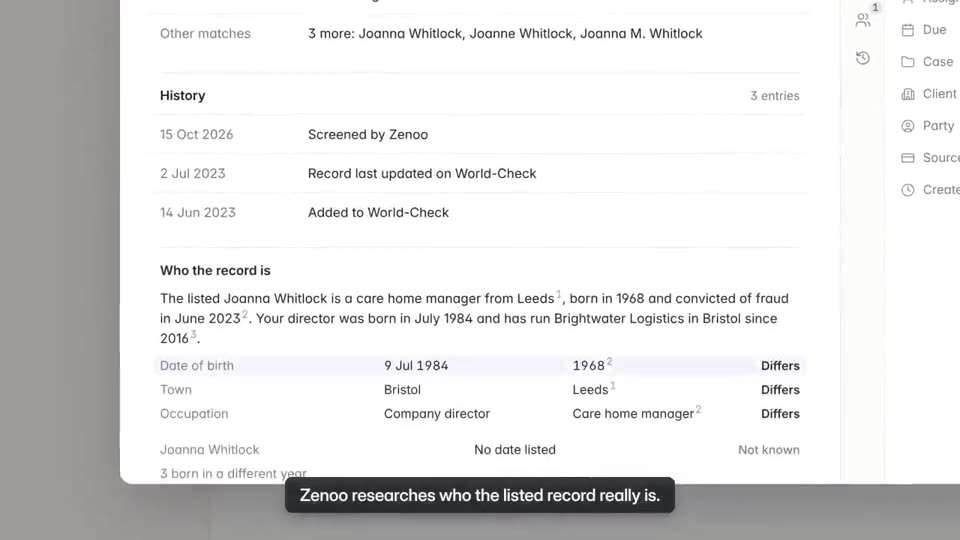
The Norwegian Bank ID Login result, beside everything else.
Verification sits with screening and review on one case, so nobody checks a second tool to see the whole customer.
What you can build
- Bank account opening for Norwegian customers
- Digital onboarding and e-KYC
- Lending and credit applications
- Access to government and welfare services
- Electronic signing of documents
About Norwegian Bank ID Login
FAQs
Norwegian Bank ID Login questions.
How do I verify a Norwegian BankID identity?
The person authenticates with their BankID app or bank-linked code device and consents to share their details. BankID then returns their full name and date of birth, plus the national identity number and contact details where consented, and Zenoo returns a verified result with a full audit trail.
What data does Norwegian BankID return?
Full name and date of birth are always returned on a successful authentication. The national identity number (fødselsnummer), residential address, email, and phone number are released only with the person's explicit consent, in line with Norwegian law.
Is Norwegian BankID mandatory?
No. BankID is a bank-issued electronic identity, not a compulsory scheme. It is held by most Norwegian adults and is the standard way to log in to banks, the tax administration, and welfare services, which makes it a high-trust route for onboarding.
Hands it to your team
Verification is the first step. Compliance Hub handles the rest.
Once a customer is verified, screening and review happen in Compliance Hub. A possible PEP match lands in your team inbox with the evidence and the full history beside it. Zenoo suggests, your team decides.
Pairs well with

Related schemes
Tomorrow, your case
Bring us a case that went wrong.
We will run it through Zenoo while you watch: the evidence, the decision, and the record your MLRO would want to defend.
30 minutes. Your data. No slides.